
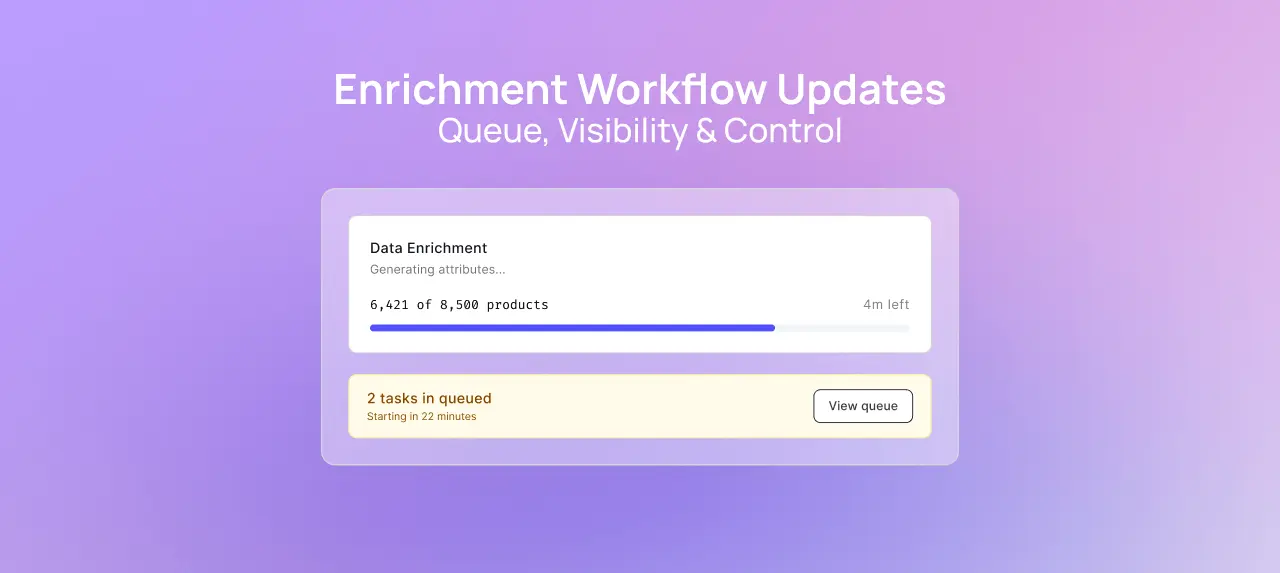
Enrichment Workflow Updates: Queue, Visibility & Control

Enrichment at scale is already powerful. Now it’s more controlled, more transparent, and easier to manage.

This feature is available for customers on the

Explore

Tier or higher. Reach out to book a demo with our sales team today.

This feature is available for customers on the

Explore

Tier. Reach out to book a demo with our sales team today.

Enrichment Workflow Updates: Queue, Visibility & Control

On this page

We’ve rolled out major improvements to how enrichment tasks are created, managed, and processed in Trustana.

These updates are designed to remove uncertainty, reduce failures, and give teams far more control over large-scale enrichment workflows.

A queue that works around your workflow, not against it

Tasks in queue can now run for up to 96 hours from creation. That means you can confidently launch large batches on a Friday or Monday and let them process without constant monitoring.

You now have full control over queued work:

  • Cancel tasks anytime before they start
  • Retry tasks that have timed out
  • Easily identify tasks that need attention with new filters

We’ve also improved visibility into task progress:

  • Clear breakdown of pending vs failed products
  • “Need Attention” filter to quickly surface issues
  • Better progress tracking during long-running jobs

To keep things running smoothly, we recommend keeping tasks within 2,000–3,000 products per batch.

Know what will fail before it fails

One of the biggest sources of frustration has been waiting hours only to discover a task failed due to missing product data.

That’s now fixed.

We’ve introduced two-stage eligibility checks:

  1. Checked before task creation
  2. Re-checked during processing

You’ll now see warnings upfront if products are missing required fields like:

  • Name
  • Brand
  • Image (or Category/Model fallback for image-less products)

You can also:

  • Filter your catalog to instantly find ineligible products
  • Launch tasks with only eligible products (others are automatically excluded)
  • Avoid unnecessary retries caused by data gaps

This shifts failures from “system confusion” to clear, actionable input fixes.

More control over how enrichment runs

We’ve added new controls and configurations to better guide how enrichment behaves:

  • Web enrichment controls: Set preferred or excluded sources, apply country restrictions
  • PDF enrichment support: Separate eligibility layer for PDF-based data extraction
  • Improved retry handling: No more corrupted timestamps or broken performance tracking

Coming soon: Targeted attribute enrichment

Today, enrichment applies across all attributes, meaning that when you enrich a product, all attributes are enriched. If you don't need all the applicable information enriched in a task, that can be a . Soon, you’ll be able to choose exactly what to update.

This means:

  • Enrich only 1–5 specific attributes instead of the full product
  • Add new attributes without reprocessing everything
  • Avoid unnecessary costs and queue congestion
  • Prevent issues from re-categorisation affecting existing data

You’ll also get clearer visibility into what attributes are being enriched across different product types.

Why this matters

Enrichment at scale only works when the system is predictable.

With longer queue windows, proactive eligibility checks, and more control over what gets processed, teams can:

  • Run larger batches with confidence
  • Reduce failed tasks and retries
  • Focus on fixing data, not chasing errors
  • Keep catalogs fresh without redoing unnecessary work

Explore the updates in your workspace or reach out for a quick walkthrough.

Not familiar with Trustana's product data enrichment capability? Book a personalized demo to see it in action.
Enrichment Workflow Update FAQ

What changed in the enrichment queue?

The enrichment queue now supports tasks for up to 96 hours from creation, allowing teams to run larger batches across multiple days without needing to restart jobs.

What happens when a task times out?

If a task reaches the 96-hour limit, its status changes to Timeout. You can still retry the task, and eligible products will resume processing without needing to recreate the job from scratch.

Can I cancel a task after creating it?

Yes. Tasks that are still in queue can be cancelled at any time. This removes them from processing and updates the task status to Cancelled.

How do I know which tasks need attention?

The Tasks page now includes a “Need Attention” filter, which highlights:

  • Timed out tasks
  • Tasks with issues
  • Tasks ready for review

This helps you quickly focus on what requires action.

What does “eligibility” mean for enrichment?

Eligibility refers to whether a product has the required data to be enriched.

For data enrichment, products typically need:

  • A product name
  • A brand
  • Either an image, category, or model

If these are missing, the product may not be eligible for enrichment.

Can I check eligibility before running a task?

Yes. You can now:

  • Use filters in the product table to find products missing required data
  • See eligibility warnings before starting a task
  • Review which products will be excluded before processing begins

This helps ensure tasks run as expected.

What happens to products that are not eligible?

Non-eligible products are automatically excluded from the task at the start. This allows eligible products to continue processing without delays.

Why are some products without images still eligible?

Products without images can still be enriched if they have either a category or a model.

Images are typically used for classification. If category or model data is already present, enrichment can still proceed without images.

Is eligibility checked more than once?

Yes. Eligibility is checked:

  1. Before the task is created
  2. Again during processing

This ensures that any changes made to product data between creation and execution are accounted for.

Is there a recommended task size?

For optimal performance, it’s recommended to keep tasks between 2,000 and 3,000 products (including variants).

What improvements were made to task visibility?

You now have:

  • Clearer breakdowns of total, pending, and failed products
  • Improved progress tracking during enrichment
  • Filters to quickly identify tasks that need action

Get an Expert Review of Your Product Data

Get practical guidance on improving catalog quality, enrichment workflows, and AI readiness based on your current setup.

Product Reviews
product-reviews
SKU Enrichment
sku-enrichment
AI PIM (AI-Powered Product Information Management)
ai-pim-ai-powered-product-information-management
Enrichment Layer
enrichment-layer
Large Language Model (LLM)
large-language-model-llm
Dynamic Synthesis
dynamic-synthesis
Operational Layer
operational-layer
Evidence Layer
evidence-layer
Probabilistic Accuracy
probabilistic-accuracy
Deterministic accuracy
deterministic-accuracy
Product Attribute
product-attribute
Intelligent Product Attribute
intelligent-product-attribute
Factual Product Attribute
factual-product-attribute
Structured Product Attribute
structured-product-attribute
Google MCP (Model Context Protocol)
google-mcp-model-context-protocol
Retrieval-Augmented Generation (RAG)
retrieval-augmented-generation-rag
Product Data Activation (PDA)
product-data-activation-pda
Product Data Architecture (PDA)
product-data-architecture-pda
Context Graph
context-graph
Buy to Detail Rate (BTD)
buy-to-detail-rate-btd
White Label Product
white-label-product
User Experience (UX)
user-experience-ux
UPC (Universal Product Code)
upc-universal-product-code
Third-Party Marketplace
third-party-marketplace
Syndication
syndication
Structured Data
structured-data
Sell-Through Rate
sell-through-rate
Stale Content
stale-content
Search Relevance
search-relevance
Search Merchandising
search-merchandising
SKU-Level Analytics
sku-level-analytics
SKU Rationalization
sku-rationalization
SKU Performance
sku-performance
SKU (Stock Keeping Unit)
sku-stock-keeping-unit
SEO (Search Engine Optimization)
seo-search-engine-optimization
Rich Media
rich-media
Retailer Portal
retailer-portal
Retail Media
retail-media
Retail Content Syndication
retail-content-syndication
Repricing Tool
repricing-tool
Retail Analytics
retail-analytics
Replatforming
replatforming
Real-Time Updates
real-time-updates
Quality Assurance (QA)
quality-assurance-qa
Product Visibility
product-visibility
Product Variant
product-variant
Product Validation
product-validation
Product Upload
product-upload
Product Title Optimization
product-title-optimization
Product Taxonomy Tree
product-taxonomy-tree
Product Taxonomy
product-taxonomy
Product Tagging
product-tagging
Product Syndication Lag
product-syndication-lag
Product Syndication
product-syndication
Product Schema
product-schema
Product Status Tracking
product-status-tracking
Product Page Bounce Rate
product-page-bounce-rate
Product Onboarding
product-onboarding
Product Metadata
product-metadata
Product Matching
product-matching
Product Lifecycle Stage
product-lifecycle-stage
Product Information Management (PIM)
product-information-management-pim
Product Lifecycle Management (PLM)
product-lifecycle-management-plm
Product Info Templates
product-info-templates
Product Import
product-import
Product Feed Validation
product-feed-validation
Product Feed Scheduling
product-feed-scheduling
Product Feed
product-feed
Product Family
product-family
Product Discovery
product-discovery
Product Export
product-export
Product Dimension Attributes
product-dimension-attributes
Product Detail Page (PDP)
product-detail-page-pdp
Product Description
product-description
Product Data Versioning
product-data-versioning
Product Data Syndication Platforms
product-data-syndication-platforms
Product Data Sheet
product-data-sheet
Product Data Quality
product-data-quality
Product Content Management (PCM)
product-content-management-pcm
Product Data Harmonization
product-data-harmonization
Product Content Enrichment
product-content-enrichment
Product Comparison
product-comparison
Product Compliance
product-compliance
Product Channel Fit
product-channel-fit
Product Categorization
product-categorization
Product Bundling
product-bundling
Product Badging
product-badging
Product Attributes
product-attributes
Product Attribute Completeness
product-attribute-completeness
Price Scraping
price-scraping
Personalization
personalization
PDP Optimization
pdp-optimization
PDP Heatmap
pdp-heatmap
PDP Conversion Rate
pdp-conversion-rate
Out-of-Stock Alerts
out-of-stock-alerts
Omnichannel
omnichannel
Omnichannel Strategy
omnichannel-strategy
Net New SKU Creation
net-new-sku-creation
Multichannel Retailing
multichannel-retailing
Metadata
metadata
Mobile Optimization
mobile-optimization
Merchant-to-Merchant (M2M)
merchant-to-merchant-m2m
Marketplace Listing Errors
marketplace-listing-errors
Marketplace Reconciliation
marketplace-reconciliation
Marketplace Compliance
marketplace-compliance
Marketplace
marketplace
MAP Pricing (Minimum Advertised Price)
map-pricing-minimum-advertised-price
Localization Tags
localization-tags
Long-Tail Keywords
long-tail-keywords
Listing Optimization
listing-optimization
Lifecycle Automation
lifecycle-automation
Key Performance Indicator (KPI)
key-performance-indicator-kpi
Inventory Management
inventory-management
Intelligent Search
intelligent-search
Image Optimization
image-optimization
Hyperpersonalization
hyperpersonalization
Headless Commerce
headless-commerce
Generative Engine Optimization (GEO)
generative-engine-optimization-geo
Generative AI
generative-ai
Fuzzy Search
fuzzy-search
GTM (Go-to-Market) Strategy
gtm-go-to-market-strategy
GTIN (Global Trade Item Number)
gtin-global-trade-item-number
Flat File
flat-file
First-Party Data
first-party-data-a51e9
First-Party Data
first-party-data
First-Mile Fulfillment
first-mile-fulfillment
Feed Testing Environment
feed-testing-environment
Feed-Based Advertising
feed-based-advertising
Feed Optimization Tool
feed-optimization-tool
Feed Management
feed-management
Feed Diagnostics
feed-diagnostics
Faceted Search
faceted-search
ERP (Enterprise Resource Planning)
erp-enterprise-resource-planning
Explainable AI
explainable-ai
Enrichment Rules
enrichment-rules
Enhanced Brand Content (EBC)
enhanced-brand-content-ebc
EPID (eBay Product ID)
epid-ebay-product-id
EAN (European Article Number)
ean-european-article-number
E-commerce Platform
e-commerce-platform
Dynamic Pricing
dynamic-pricing
Duplicate Content
duplicate-content
Direct-to-Consumer (DTC)
direct-to-consumer-dtc
Drop Shipping
drop-shipping
Digital Transformation
digital-transformation
Digital Shelf
digital-shelf
Digital Asset Management (DAM)
digital-asset-management-dam
Data Syncing
data-syncing
Data Normalization
data-normalization
Data Mapping
data-mapping
Data Governance
data-governance
Data Feed Transformation
data-feed-transformation
Data Feed Rules
data-feed-rules
Data Feed Error Report
data-feed-error-report
Data Enrichment Pipeline
data-enrichment-pipeline
Data Drift
data-drift
Data Deduplication
data-deduplication
Data Clean-up
data-clean-up
Customer Experience (CX)
customer-experience-cx
Conversion Rate
conversion-rate
Content Scalability
content-scalability
Content Localization
content-localization
Content Governance
content-governance
Content Gaps
content-gaps
Consumer-to-Merchant (C2M)
consumer-to-merchant-c2m
Channel-Specific Optimization
channel-specific-optimization
Channel Readiness
channel-readiness
Category Mapping
category-mapping
Catalog Management
catalog-management
Buy Now, Pay Later (BNPL)
buy-now-pay-later-bnpl
Buy Box
buy-box
Breadcrumb Navigation
breadcrumb-navigation
Automated Categorization
automated-categorization
Automated Content Generation
automated-content-generation
Automated Workflows
automated-workflows
Blacklisting (in feeds)
blacklisting-in-feeds
Attribution Tags
attribution-tags
Attribute Standardization
attribute-standardization
Answer Engine Optimization (AEO)
answer-engine-optimization-aeo
Artificial Intelligence (AI)
artificial-intelligence-ai
Attribute Mapping
attribute-mapping
Agentic E-commerce
agentic-e-commerce
A/B Testing
a-b-testing
API (Application Programming Interface)
api-application-programming-interface
AI Overviews
ai-overviews
AI Tagging
ai-tagging
AI Agents
ai-agents
AI Indexing
ai-indexing