
Introducing: Auto Frame | AI Product Image Framing for Ecommerce

Consistent Product Image Framing and Margin Control Without Manual Work

This feature is available for customers on the

Tier or higher. Reach out to book a demo with our sales team today.

This feature is available for customers on the

Tier. Reach out to book a demo with our sales team today.

Introducing: Auto Frame | AI Product Image Framing for Ecommerce

On this page

When teams pull images from multiple sources, inconsistency is inevitable. Background colors vary, products sit too close to the edge or float unevenly, and empty space appears where it shouldn’t.

To fix it, teams reframe images manually. For catalogs with ten or more images per SKU, this quickly becomes a major drain on time.

Auto Frame removes this step entirely, giving teams back precious hours better spent elsewhere.

What Is Auto Frame?

Auto Frame is an automated image editing tool built into Trustana’s Image Enrichment workflow. Its purpose is simple: standardize product images reliably, at scale, without manual intervention.

Instead of resizing images individually, Auto Frame identifies the object, calculates how it fits within a standardized canvas, and places it consistently every time. The result is a clean, professional frame that looks intentional across PDPs, categories, and channels.

It works across hundreds of images in a single task.

How it works

Most AI image editing tools focus on the canvas. They resize the outer dimensions under the assumption that the product inside looks acceptable. In practice, this leads to stretched images, distorted proportions, or objects that appear misaligned relative to each other.

Trustana’s Auto Frame feature takes a different approach:

  1. First, Auto Frame identifies the product itself.
    It uses AI to detect the product inside the image and draws a tight boundary around it, called the Object Frame. If there are multiple parts or attached text, they are treated as one object, so nothing is cut off or altered.
  1. Next, Auto Frame fits that product into a standardized layout.
    It calculates an inner frame based on the target canvas size, plus any margins or padding you set in the provided fields. The product is then automatically resized, if needed, to fit safely within this space without stretching or distortion.
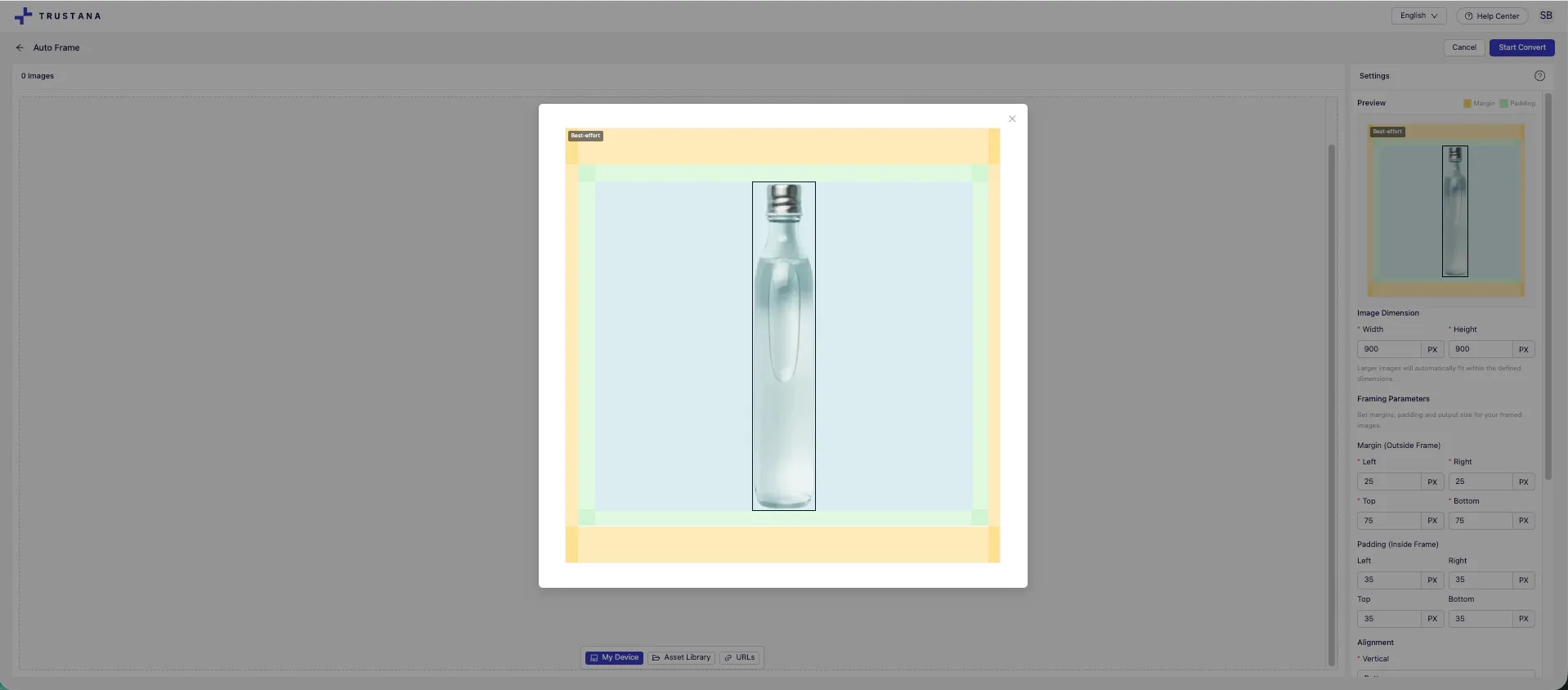
An image for the Auto Frame tool preview - showing custom framing parameters, including margins, padding, and alignment fields

The result is a reliable process that delivers a framed image, in dimensions consistent with your specifications.

Consistent Quality, Built for Scale

A big concern with batch image processing is quality loss when images are stretched to fit a larger canvas. Auto Frame avoids this by only resizing images down, never up, ensuring consistent quality at scale.

If a product cannot fit inside the frame without being enlarged, the image is skipped automatically. This eligibility check happens before processing, removing the need for manual QA.

Teams get full control. Backgrounds can be matched to the original image or set to a fixed hex color, without altering the product itself. Images can be centered or bottom-aligned to support both vertical and horizontal formats, and files can remain in their original format or be converted to JPEG or PNG, all without compression.

Seeing is Believing, Try Auto Frame Today

Auto Frame is available now inside Trustana’s Image Enrichment workflow.

If your team is manually framing product images today, whether in PowerPoint, Photoshop, or through outsourced services, Auto Frame replaces that process with a consistent, automated, and quality-safe alternative.

Talk to an expert and see it in action to explore how Auto Frame fits into your existing workflows for digital assets and product images.
Auto Frame FAQ

How does Auto Frame change day-to-day catalog operations?

Auto Frame removes image framing from the critical path of SKU launches. Teams no longer need to queue images for manual prep or wait on design resources, which allows catalogs to move from enrichment to publish faster.

What workflows does Auto Frame replace or simplify?

Auto Frame replaces manual framing done in PowerPoint, Photoshop, or through outsourced image services. It also reduces back-and-forth QA cycles caused by inconsistent object placement across PDP images.

Can Auto Frame be used safely without reviewing every image?

Yes. Auto Frame enforces quality rules automatically by skipping images that would require upscaling. This allows teams to process images in bulk without manually checking for distortion or misalignment.

How does Auto Frame support faster product launches?

Because framing is automated and batch-based, teams can prepare hundreds of images at once instead of processing them SKU by SKU. This removes one of the most common bottlenecks in getting products live.

What kind of image consistency does this enable on PDPs?

Auto Frame ensures that products sit in the same visual position across all images in a gallery, even when source images vary in size or orientation. This creates cleaner, more professional PDPs without custom design work.

How does Auto Frame affect downstream teams like merchandising or marketing?

By standardizing image framing upstream, merchandising and marketing teams receive cleaner, more predictable assets. This reduces rework when images are reused across categories, campaigns, or channels.

Can Auto Frame be applied to existing catalogs, not just new products?

Yes. Auto Frame can be run across existing product image libraries, replacing current images while keeping their position in PDP galleries. This makes it possible to clean up live catalogs without rebuilding layouts.

Does Auto Frame reduce reliance on external agencies or design tools?

Yes. Teams that previously relied on outsourced image editing or specialized design tools can handle framing directly within Trustana, lowering costs and reducing turnaround time.

How does Auto Frame help teams scale without adding headcount?

Auto Frame allows a small team to process image volumes that previously required dedicated design or ops resources. Framing becomes a rule-based system instead of a manual task.

What types of teams see the most value from this release?

Auto Frame is especially valuable for ecommerce operators managing large catalogs, multi-image PDPs, and frequent SKU updates, including B2B, industrial, and marketplace-driven retailers.

Get an Expert Review of Your Product Data

Get practical guidance on improving catalog quality, enrichment workflows, and AI readiness based on your current setup.

dynamic synthesis
dynamic-synthesis
operational layer
operational-layer
Evidence Layer
evidence-layer
Probabilistic Accuracy
probabilistic-accuracy
Deterministic accuracy
deterministic-accuracy
Product Attribute
product-attribute
Intelligent Product Attribute
intelligent-product-attribute
Factual Product Attribute
factual-product-attribute
Structured Product Attribute
structured-product-attribute
Google MCP (Model Context Protocol)
google-mcp-model-context-protocol
Retrieval-Augmented Generation (RAG)
retrieval-augmented-generation-rag
Product Data Activation (PDA)
product-data-activation-pda
Product Data Architecture (PDA)
product-data-architecture-pda
Context Graph
context-graph
Buy to Detail Rate (BTD)
buy-to-detail-rate-btd
White Label Product
white-label-product
User Experience (UX)
user-experience-ux
UPC (Universal Product Code)
upc-universal-product-code
Third-Party Marketplace
third-party-marketplace
Syndication
syndication
Structured Data
structured-data
Sell-Through Rate
sell-through-rate
Stale Content
stale-content
Search Relevance
search-relevance
Search Merchandising
search-merchandising
SKU-Level Analytics
sku-level-analytics
SKU Rationalization
sku-rationalization
SKU Performance
sku-performance
SKU (Stock Keeping Unit)
sku-stock-keeping-unit
SEO (Search Engine Optimization)
seo-search-engine-optimization
Rich Media
rich-media
Retailer Portal
retailer-portal
Retail Media
retail-media
Retail Content Syndication
retail-content-syndication
Repricing Tool
repricing-tool
Retail Analytics
retail-analytics
Replatforming
replatforming
Real-Time Updates
real-time-updates
Quality Assurance (QA)
quality-assurance-qa
Product Visibility
product-visibility
Product Variant
product-variant
Product Validation
product-validation
Product Upload
product-upload
Product Title Optimization
product-title-optimization
Product Taxonomy Tree
product-taxonomy-tree
Product Taxonomy
product-taxonomy
Product Tagging
product-tagging
Product Syndication Lag
product-syndication-lag
Product Syndication
product-syndication
Product Schema
product-schema
Product Status Tracking
product-status-tracking
Product Page Bounce Rate
product-page-bounce-rate
Product Onboarding
product-onboarding
Product Metadata
product-metadata
Product Matching
product-matching
Product Lifecycle Stage
product-lifecycle-stage
Product Information Management (PIM)
product-information-management-pim
Product Lifecycle Management (PLM)
product-lifecycle-management-plm
Product Info Templates
product-info-templates
Product Import
product-import
Product Feed Validation
product-feed-validation
Product Feed Scheduling
product-feed-scheduling
Product Feed
product-feed
Product Family
product-family
Product Discovery
product-discovery
Product Export
product-export
Product Dimension Attributes
product-dimension-attributes
Product Detail Page (PDP)
product-detail-page-pdp
Product Description
product-description
Product Data Versioning
product-data-versioning
Product Data Syndication Platforms
product-data-syndication-platforms
Product Data Sheet
product-data-sheet
Product Data Quality
product-data-quality
Product Content Management (PCM)
product-content-management-pcm
Product Data Harmonization
product-data-harmonization
Product Content Enrichment
product-content-enrichment
Product Comparison
product-comparison
Product Compliance
product-compliance
Product Channel Fit
product-channel-fit
Product Categorization
product-categorization
Product Bundling
product-bundling
Product Badging
product-badging
Product Attributes
product-attributes
Product Attribute Completeness
product-attribute-completeness
Price Scraping
price-scraping
Personalization
personalization
PDP Optimization
pdp-optimization
PDP Heatmap
pdp-heatmap
PDP Conversion Rate
pdp-conversion-rate
Out-of-Stock Alerts
out-of-stock-alerts
Omnichannel
omnichannel
Omnichannel Strategy
omnichannel-strategy
Net New SKU Creation
net-new-sku-creation
Multichannel Retailing
multichannel-retailing
Metadata
metadata
Mobile Optimization
mobile-optimization
Merchant-to-Merchant (M2M)
merchant-to-merchant-m2m
Marketplace Listing Errors
marketplace-listing-errors
Marketplace Reconciliation
marketplace-reconciliation
Marketplace Compliance
marketplace-compliance
Marketplace
marketplace
MAP Pricing (Minimum Advertised Price)
map-pricing-minimum-advertised-price
Localization Tags
localization-tags
Long-Tail Keywords
long-tail-keywords
Listing Optimization
listing-optimization
Lifecycle Automation
lifecycle-automation
Key Performance Indicator (KPI)
key-performance-indicator-kpi
Inventory Management
inventory-management
Intelligent Search
intelligent-search
Image Optimization
image-optimization
Hyperpersonalization
hyperpersonalization
Headless Commerce
headless-commerce
Generative Engine Optimization (GEO)
generative-engine-optimization-geo
Generative AI
generative-ai
Fuzzy Search
fuzzy-search
GTM (Go-to-Market) Strategy
gtm-go-to-market-strategy
GTIN (Global Trade Item Number)
gtin-global-trade-item-number
Flat File
flat-file
First-Party Data
first-party-data-a51e9
First-Party Data
first-party-data
First-Mile Fulfillment
first-mile-fulfillment
Feed Testing Environment
feed-testing-environment
Feed-Based Advertising
feed-based-advertising
Feed Optimization Tool
feed-optimization-tool
Feed Management
feed-management
Feed Diagnostics
feed-diagnostics
Faceted Search
faceted-search
ERP (Enterprise Resource Planning)
erp-enterprise-resource-planning
Explainable AI
explainable-ai
Enrichment Rules
enrichment-rules
Enhanced Brand Content (EBC)
enhanced-brand-content-ebc
EPID (eBay Product ID)
epid-ebay-product-id
EAN (European Article Number)
ean-european-article-number
E-commerce Platform
e-commerce-platform
Dynamic Pricing
dynamic-pricing
Duplicate Content
duplicate-content
Direct-to-Consumer (DTC)
direct-to-consumer-dtc
Drop Shipping
drop-shipping
Digital Transformation
digital-transformation
Digital Shelf
digital-shelf
Digital Asset Management (DAM)
digital-asset-management-dam
Data Syncing
data-syncing
Data Normalization
data-normalization
Data Mapping
data-mapping
Data Governance
data-governance
Data Feed Transformation
data-feed-transformation
Data Feed Rules
data-feed-rules
Data Feed Error Report
data-feed-error-report
Data Enrichment Pipeline
data-enrichment-pipeline
Data Drift
data-drift
Data Deduplication
data-deduplication
Data Clean-up
data-clean-up
Customer Experience (CX)
customer-experience-cx
Conversion Rate
conversion-rate
Content Scalability
content-scalability
Content Localization
content-localization
Content Governance
content-governance
Content Gaps
content-gaps
Consumer-to-Merchant (C2M)
consumer-to-merchant-c2m
Channel-Specific Optimization
channel-specific-optimization
Channel Readiness
channel-readiness
Category Mapping
category-mapping
Catalog Management
catalog-management
Buy Now, Pay Later (BNPL)
buy-now-pay-later-bnpl
Breadcrumb Navigation
breadcrumb-navigation
Automated Categorization
automated-categorization
Automated Content Generation
automated-content-generation
Automated Workflows
automated-workflows
Blacklisting (in feeds)
blacklisting-in-feeds
Attribution Tags
attribution-tags
Attribute Standardization
attribute-standardization
Answer Engine Optimization (AEO)
answer-engine-optimization-aeo
Artificial Intelligence (AI)
artificial-intelligence-ai
Attribute Mapping
attribute-mapping
Agentic E-commerce
agentic-e-commerce
A/B Testing
a-b-testing
API (Application Programming Interface)
api-application-programming-interface
AI Overviews
ai-overviews
AI Tagging
ai-tagging
AI Agents
ai-agents
AI Indexing
ai-indexing